
FW 07.00.00/HAFM SW 08.06.00 McDATA Intrepid 6064 Director Installation and Service Manual (620-000108-920, April 2005)


3
3-50
Intrepid® 6064 Director Installation and Service Manual
Maintenance Analysis Procedures (MAPS)
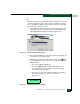
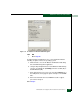
Figure 3-13 Windows Security Dialog Box
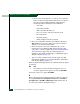
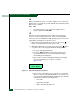
b. Click Task Manager. The Windows Task Manager dialog box
displays with the Applications page open (Figure 3-14).
Figure 3-14 Windows Task Manager Dialog Box (Applications Page)
c. Select (highlight) the EFCM or SANavigator entry and click End
Task. The SAN management application closes.
Continue.