
FW 07.00.00/HAFM SW 08.06.00 McDATA Intrepid 6064 Director Installation and Service Manual (620-000108-920, April 2005)


3
3-52
Intrepid® 6064 Director Installation and Service Manual
Maintenance Analysis Procedures (MAPS)
4. Ignore the message. After ten seconds, the server performs
the boot sequence from the BIOS. During the boot sequence,
the server performs additional POSTs and displays the
following operational information at the LCD panel:
•Host name.
• System date and time.
• LAN 1 and LAN 2 IP addresses.
• Fan 1, fan 2, fan 3, and fan 4 rotational speed.
• CPU temperature.
• Hard disk capacity.
• Virtual and physical memory capacity.
d. After successful POST completion, the LCD panel displays a
Welcome!! message, then continuously cycles through and
displays server operational information.
e. After rebooting the server at the LCD panel, log on to the
management server Windows 2000 desktop through a LAN
connection to a browser-capable PC (Access the Management
Server Desktop on page 2-26). The SAN management
application starts and the EFCM Log In or SANavigator Log In
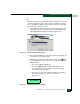
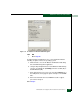
dialog box displays (Figure 3-3).
f. Type a user name and password, and click Login. The SAN
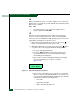
management application opens and the EFCM or SANavigator
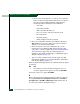
main window displays (Figure 3-4).
Did the main window display and does the SAN management appear
operational?
NO YES
↓ The problem is transient and the management server or
customer-supplied server appears operational. Exit MAP.
Contact the next level of support. Exit MAP.
4
Did the SAN management application display a dialog box with the
message Connection to management server lost - click OK to
exit application or EFCM or SANavigator error n (where n is an
error message number 1 through 8 inclusive)?