
FW 07.00.00/HAFM SW 08.06.00 McDATA Intrepid 6064 Director Installation and Service Manual (620-000108-920, April 2005)


3
MAP 0400: Loss of Server Communication
3-57
Maintenance Analysis Procedures (MAPS)
• Fan 1, fan 2, fan 3, and fan 4 rotational speed.
• CPU temperature.
• Hard disk capacity.
• Virtual and physical memory capacity.
c. After successful POST completion, the LCD panel displays a
Welcome!! message, then continuously cycles through and
displays server operational information.
d. After rebooting the server at the LCD panel, log on to the
management server Windows 2000 desktop through a LAN
connection to a browser-capable PC (Access the Management
Server Desktop on page 2-26). The SAN management
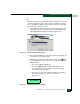
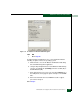
application starts and the EFCM Log In or SANavigator Log In
dialog box displays (Figure 3-3).
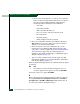
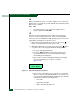
e. Type a user name and password, and click Login. The SAN
management application opens and the EFCM or SANavigator
or EFCM main window displays (Figure 3-4).
Did the main window display and does the SAN management
application appear operational?
NO YES
↓ The problem is transient and the management server or
customer-supplied server appears operational. Exit MAP.
Contact the next level of support. Exit MAP.
MAP 0400: Loss of Server Communication
This MAP describes fault isolation of the Ethernet communication
link between a director and the management server or
customer-supplied server, or between a director and a web browser
PC running the SANpilot interface. Failure indicators include:
• Event codes recorded at the Intrepid 6064 Event Log or SANpilot
event log.
• At the EFCM or SANavigator main window, a grey square with
an exclamation mark associated with the icon representing the
director reporting the problem.