
FW 07.00.00/HAFM SW 08.06.00 McDATA Intrepid 6064 Director Installation and Service Manual (620-000108-920, April 2005)



3
MAP 0400: Loss of Server Communication
3-61
Maintenance Analysis Procedures (MAPS)
8
Transmit or receive errors for a director Ethernet adapter (on each
CTP2 card) exceeded a threshold, the director-to-server link was not
connected, or the director-to-server link timed out. A problem with the
Ethernet cable, Ethernet hub or hubs, or other LAN-attached device is
indicated.
Verify the director is connected to the management server or
customer-supplied server through one or more Ethernet hubs.
a. Ensure an RJ-45 Ethernet cable connects both of the director
CTP2 cards to an Ethernet hub. If not, connect the cables as
directed by the customer.
b. Ensure an RJ-45 Ethernet cable connects the management
server to an Ethernet hub. If not, connect the cable as directed
by the customer.
c. Ensure the Ethernet cables are not damaged. If damaged,
replace the cables.
Was a corrective action performed?
NO YES
↓ Go to step 1.
9
Does the LAN configuration use multiple (up to four) Ethernet hubs
that are daisy-chained?
YES NO
↓ Go to step 11.
10
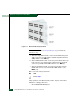
Verify the hubs are correctly daisy-chained (Figure 3-19.)