
FW 07.00.00/HAFM SW 08.06.00 McDATA Intrepid 6064 Director Installation and Service Manual (620-000108-920, April 2005)



3
3-62
Intrepid® 6064 Director Installation and Service Manual
Maintenance Analysis Procedures (MAPS)
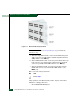
Figure 3-19 Ethernet Hubs, Daisy-Chained
NOTE: To check two hubs, use step a and step b (top and middle hub
instructions only).
a. At the first (top) Ethernet hub, ensure an RJ-45 Ethernet patch
cable connects to port 24 and the medium-dependent interface
(MDI) switch is set to MDI (in).
b. At the middle Ethernet hub, ensure the patch cable from the top
hub connects to port 12, the patch cable from the bottom hub
connects to port 24, and the MDI switch is set to MDI (in).
c. At the bottom Ethernet hub, ensure the patch cable from the
middle hub connects to port 12 and the MDI switch is set to
MDIX (out).
Was a corrective action performed?
NO YES
↓ Go to step 1.
11
Verify operation of the Ethernet hub or hubs. Inspect each hub for
indications of being powered on:
• Green Power LED illuminated.