
FW 07.00.00/HAFM SW 08.06.00 McDATA Intrepid 6064 Director Installation and Service Manual (620-000108-920, April 2005)



3
3-66
Intrepid® 6064 Director Installation and Service Manual
Maintenance Analysis Procedures (MAPS)
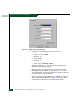
a. At the EFCM or SANavigator main window, select Logout from
the SAN menu. The application logs out and the EFCM Log In or
SANavigator Log In dialog box displays (Figure 3-3).
b. Type a user name and password.
c. Type the IP address of the management server or customer-
supplied server running the first instance of the SAN
management application in the Network Address field.
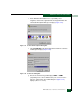
d. Click Login. The SAN management application opens and the
EFCM or SANavigator main window displays (Figure 3-4).
Did the management server or customer-supplied server reconfigure
as a client and did the Ethernet connection recover?
NO YES
↓ The director-to-server connection is restored and the second
management server or customer-supplied server appears
operational as a client. Exit MAP.
Contact the next level of support. Exit MAP.
21
The IP address defining the director to the SAN management
application is incorrect or unknown and must be verified. A
maintenance terminal (PC) and asynchronous RS-232 null modem
cable are required to verify the director IP address. The tools are
provided with the director or by service personnel. To verify the IP
address:
a. Remove the protective cap from the 9-pin maintenance port at
the rear of the director (a phillips-tip screwdriver may be
required). Connect one end of the RS-232 null modem cable to
the port.
b. Connect the other cable end to a 9-pin communication port
(COM1 or COM2) at the rear of the maintenance terminal PC.
c. Power on the maintenance terminal. After the PC powers on, the
Windows desktop displays.
d. At the Windows desktop, click Start at the left side of the task
bar. The Windows Workstation menu displays.
NOTE: The following steps describe inspecting the IP address using
HyperTerminal serial communication software.