
FW 07.00.00/HAFM SW 08.06.00 McDATA Intrepid 6064 Director Installation and Service Manual (620-000108-920, April 2005)



3
MAP 0400: Loss of Server Communication
3-67
Maintenance Analysis Procedures (MAPS)
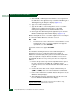
e. At the Windows Workstation menu, sequentially select
Programs, Accessories, Hyperterminal, and HyperTerminal. The
Connection Description dialog box displays (Figure 3-21).
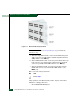
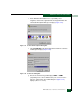
Figure 3-21 Connection Description Dialog Box
f. Type Intrepid 6064 in the Name field and click OK. The Connect
To dialog box displays (Figure 3-22).
Figure 3-22 Connect To Dialog Box
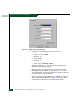
g. Ensure the Connect using field displays COM1 or COM2
(depending on the serial communication port connection to the
director), and click OK. The COMn dialog box (Figure 3-23)
displays (where n is 1 or 2).