
FW 07.00.00/HAFM SW 08.06.00 McDATA Intrepid 6064 Director Installation and Service Manual (620-000108-920, April 2005)

3
MAP 0600: Port Card Failure and Link Incident Analysis
3-89
Maintenance Analysis Procedures (MAPS)
Link interface incident - bit-error threshold exceeded.
Link failure - loss of signal or loss of synchronization.
Link failure - not-operational primitive sequence (NOS)
received.
Link failure - primitive sequence timeout.
Link failure - invalid primitive sequence received for the
current link state.
Did one of the listed messages appear in the Link Incident Log?
YES NO
↓ The director appears operational. Exit MAP.
Go to step 33.
14
A port card (all ports) failed an internal or external loopback test.
a. Reset each port that failed the loopback test.
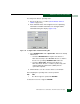
1. At the Hardware View, right-click the port. A pop-up menu
appears.
2. Select Reset Port. A This operation will cause a link reset
to be sent to the attached device message displays.
3. Click OK. The port resets.
b. Perform an external loopback test for all ports that were reset
(External Loopback Test (Management Server) on page 4-32).
Did resetting ports solve the problem?
NO YES
↓ The director appears operational. Exit MAP.
15
An electronic circuit breaker on the port card may have tripped. To
reset the circuit breaker, partially remove and reseat the port card for
which external loopback tests failed (RRP: Port Module Card (UPM
and XPM) on page 5-11).
a. Unseat and disconnect the port card from the backplane. Unseat
the card only, do not remove it from the director chassis.
b. Reseat the port card in the backplane.