
FW 07.00.00/HAFM SW 08.06.00 McDATA Intrepid 6064 Director Installation and Service Manual (620-000108-920, April 2005)

3
3-92
Intrepid® 6064 Director Installation and Service Manual
Maintenance Analysis Procedures (MAPS)
20
The port connection conflicts with the configured port type. Either an
expansion port (E_Port) is incorrectly cabled to a Fibre Channel
device or a fabric port (F_Port) is incorrectly cabled to a fabric
element (director or switch).
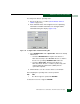
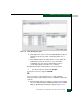
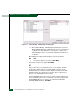
a. At the management server Hardware View, click Configure and
select Ports. The Configure Ports dialog box displays.
b. Use the vertical scroll bar as necessary to display the
information row for the port indicating an invalid attachment.
c. Select (click) the Type field and configure the port from the list
box as follows:
• Select fabric port (F_Port) if the port is cabled to a device
(node).
• Select expansion port (E_Port) if the port is cabled to a fabric
element (director or switch) to form an ISL.
d. Click Activate to save the configuration information and close the
window.
Did reconfiguring the port type solve the problem?
NO YES
↓ The director appears operational. Exit MAP.
Contact the next level of support. Exit MAP.
21
One of the following mode-mismatch conditions was detected and an
ISL connection is not allowed:
• The director is configured for operation in Open Fabric 1.0 mode
and is connected to a fabric element not configured to Open
Fabric 1.0 mode.
• The director is configured for operation in Open Fabric 1.0 mode
and is connected to a legacy McDATA director or switch at the
incorrect Exchange Link Parameter (ELP) revision level.
• The director is configured for operation in Open Fabric 1.0 mode
and is connected to a non-McDATA switch at the incorrect ELP
revision level.
• The director is configured for operation in McDATA Fabric 1.0
mode and is connected to a non-McDATA switch.