
FW 07.00.00/HAFM SW 08.06.00 McDATA Intrepid 6064 Director Installation and Service Manual (620-000108-920, April 2005)

3
MAP 0600: Port Card Failure and Link Incident Analysis
3-93
Maintenance Analysis Procedures (MAPS)
Reconfigure the director operating mode:
a. Ensure the director is set offline (Set the Director Online or
Offline on page 4-43).
b. At the Hardware View, click Configure and select Operating
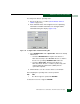
Parameters and Fabric Parameters. The Configure Fabric
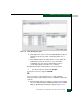
Parameters dialog box displays (Figure 3-34).
Figure 3-34 Configure Fabric Parameters Dialog Box
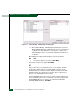
c. Select McDATA Fabric 1.0 or Open Fabric 1.0 from the Interop
Mode list box.
— Select the McDATA Fabric 1.0 option if the director is
fabric-attached only to other McDATA directors or switches
that are also operating in McDATA Fabric 1.0 mode.
— Select the Open Fabric 1.0 option if the director is
fabric-attached to directors or switches produced by other
original equipment manufacturers (OEMs) that are
open-fabric compliant.
d. Click Activate to save the selection and close the window.
Did configuring the operating mode solve the problem?
NO YES
↓ The director appears operational. Exit MAP.
Contact the next level of support. Exit MAP.