
FW 07.00.00/HAFM SW 08.06.00 McDATA Intrepid 6064 Director Installation and Service Manual (620-000108-920, April 2005)

3
3-96
Intrepid® 6064 Director Installation and Service Manual
Maintenance Analysis Procedures (MAPS)
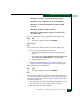
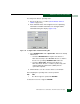
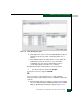
a. At the Hardware View, click Configure and select Switch Binding
and Change State. The Switch Binding - State Change dialog
box displays (Figure 3-35).
Figure 3-35 Switch Binding - State Change Dialog Box
b. Ensure the Enable Switch Binding checkbox is enabled
(checked) for both directors.
c. Ensure the Connection Policy radio buttons are compatible for
both directors.
d. Click Activate for each director or switch. The switch binding
feature is consistently enabled for both directors or switches.
Did configuring the switch binding parameters solve the problem?
NO YES
↓ The director appears operational. Exit MAP.
Contact the next level of support. Exit MAP.
29
A port connection is not allowed because of a fabric binding
mismatch. Fabric membership lists must be compatible for both
fabric elements.
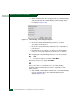
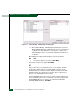
a. At the EFCM or SANavigator main window, select Fabric Binding
from the Configure menu. The Fabric Binding dialog box
displays (Figure 3-36).