
FW 07.00.00/HAFM SW 08.06.00 McDATA Intrepid 6064 Director Installation and Service Manual (620-000108-920, April 2005)

3
MAP 0700: Fabric, ISL, and Segmented Port Problem Determination
3-107
Maintenance Analysis Procedures (MAPS)
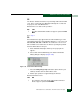
YES NO
↓ Fault isolation is being performed through the SANpilot
interface. Go to step 26.
4
At the management server, does a yellow triangle (attention indicator)
appear to overlay a port card graphic at the Hardware View?
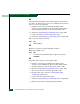
YES NO
↓ The problem is transient and the director-to-fabric element
connection appears operational. Exit MAP.
5
Inspect the port state and LED status for all ports with an attention
indicator.
a. At the Hardware View, double-click the port graphic with the
attention indicator. The Port Properties dialog box displays.
b. Inspect the Operational State field at the Port Properties dialog
box.
Does the Operational State field indicate Segmented E_Port?
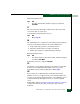
YES NO
↓ Analysis for a port card failure or other link incident is not
described in this MAP. Go to MAP 0600: Port Card Failure
and Link Incident Analysis on page 3-83. Exit MAP.
6
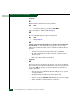
Inspect the Segmentation Reason field at the Port Properties dialog
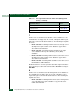
box. Table 3-15 lists port segmentation reasons and associated steps
that describe fault isolation procedures.
Table 3-15 Port Segmentation Reasons and Actions (Management
Server)
Segmentation Reason Action
Incompatible operating parameters. Go to step 14.
Duplicate domain IDs. Go to step 15.
Incompatible zoning configurations. Go to step 16.