
FW 07.00.00/HAFM SW 08.06.00 McDATA Intrepid 6064 Director Installation and Service Manual (620-000108-920, April 2005)


3
MAP 0700: Fabric, ISL, and Segmented Port Problem Determination
3-113
Maintenance Analysis Procedures (MAPS)
c. Set both directors or switches offline (Set the Director Online or
Offline on page 4-43).
d. At the Hardware View for the first director or switch reporting the
problem, click Configure and select Operating Parameters and
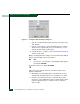
Switch Parameters. The Configure Switch Parameters dialog box
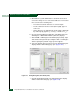
displays (Figure 3-42).
Figure 3-42 Configure Switch Parameters Dialog Box
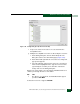
e. Type the customer-determined preferred domain ID value, then
click Activate.
f. Repeat step d and step e at the Hardware View for the director
attached to the segmented E_Port (second director or switch).
Use a different preferred domain ID value.
g. Set both directors or switches online (Set the Director Online or
Offline on page 4-43).
Did the domain ID change solve the problem and did both directors
join through the ISL to form a fabric?
NO YES
↓ The directors, associated ISL, and multiswitch fabric appear
operational. Exit MAP.
Contact the next level of support. Exit MAP.
16
A director E_Port segmented because two directors had incompatible
zoning configurations. An identical zone name is recognized in the
active zone set for both directors, but the zones contain different
members.