
FW 07.00.00/HAFM SW 08.06.00 McDATA Intrepid 6064 Director Installation and Service Manual (620-000108-920, April 2005)


3
3-114
Intrepid® 6064 Director Installation and Service Manual
Maintenance Analysis Procedures (MAPS)
a. Work with the system administrator to determine the desired
zone name change for one of the affected directors. Zone names
must conform to the following rules:
• The name must be 64 characters or fewer in length.
• The first character must be a letter (a through z), upper or
lower case.
• Other characters are alphanumeric (a through z or 0 through
9), dollar sign ($), hyphen (-), caret (^), or underscore (_).
b. Close the Element Manager application (Hardware View). The
SANavigator or EFCM main window (still active) displays.
c. At the EFCM or SANavigator main window physical map, right-
click the blue background representing the fabric containing the
switch reporting the problem. A pop-up menu appears.
d. Select the Zoning option from the menu. The Zoning dialog box
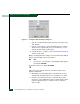
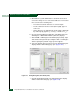
displays with the Zone Library page open (Figure 3-43).
Figure 3-43 Zoning Dialog Box (Zone Library Tab)
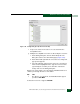
e. Click the Active Zone Set tab. The Zoning dialog box displays
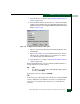
with the Active Zone Set page open (Figure 3-44).