
FW 07.00.00/HAFM SW 08.06.00 McDATA Intrepid 6064 Director Installation and Service Manual (620-000108-920, April 2005)

3
MAP 0800: Server Hardware Problem Determination
3-123
Maintenance Analysis Procedures (MAPS)
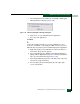
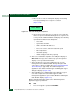
a. Select Shutdown from the SAN menu. An EFCM or SANavigator
Message dialog box displays (Figure 3-45).
Figure 3-45 EFCM or SANavigator Message Dialog Box
b. Click Yes to close the SAN management application.
c. Close any other applications.
Continue.
5
Inspect the available random access memory (RAM). The server
must have a minimum of 128 megabytes (MB) of memory to run the
Windows-based operating system and SAN management application.
a. Right-click anywhere on the Windows task bar at the bottom of
the desktop. A pop-up menu appears.
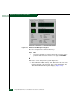
b. Select Task Manager. The Windows Task Manager dialog box
displays with the Applications page open. Click the Performance
tab to open the Performance page (Figure 3-46).
c. At the Physical Memory (K) portion of the dialog box, inspect the
total amount of physical memory.
d. Close the dialog box by clicking Close (X) at the upper right
corner of the window.