
FW 07.00.00/HAFM SW 08.06.00 McDATA Intrepid 6064 Director Installation and Service Manual (620-000108-920, April 2005)


4
4-2
Intrepid® 6064 Director Installation and Service Manual
Repair Information
NOTE: Do not perform repairs until a failure is isolated to a FRU. If fault
isolation was not performed, go to MAP 0000: Start MAP on page 3-9.
Factory Defaults
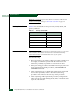
Table 4-1 lists the defaults for the passwords, and IP, subnet, and
gateway addresses.
Procedural Notes
NOTE: The screens in this manual may not match the screens on your server
and workstation. The title bars have been removed and the fields may
contain data that does not match the data seen on your system.
Note the following:
1. Before performing a procedure, read the procedure carefully and
thoroughly to familiarize yourself with the information and
reduce the possibility of problems or customer down time.
2. When performing procedures described in this chapter, follow all
electrostatic discharge (ESD) procedures, and DANGER and
CAUTION statements.
3. After completing steps of a detailed procedure that is referenced
from another procedure, return to the initial (referencing)
procedure and continue to the next step of that procedure.
4. After completing a FRU replacement procedure, extinguish the
amber system error light-emitting diode (LED) on the bezel at the
top front of the director.
Table 4-1 Factory-Set Defaults
Item Default
Customer password password
Maintenance password level-2
IP address 10.1.1.10
Subnet mask 255.0.0.0
Gateway address 0.0.0.0