
FW 07.00.00/HAFM SW 08.06.00 McDATA Intrepid 6064 Director Installation and Service Manual (620-000108-920, April 2005)

4
4-4
Intrepid® 6064 Director Installation and Service Manual
Repair Information
SAN Management
Logs
To open a log from a SAN management application main window,
select the Logs option from the Monitor menu, then click (select) the
desired log option.
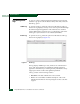
Audit Log To open the Audit Log, select the option from the Monitor and Logs
menus. The log displays a history of user actions performed through
the SAN management application. This information is useful for
system administrators and users. For a log description, refer to the
SANavigator Software Release 4.1 User Manual (621-000013).
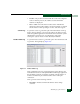
Event Log To open the Event Log, select the option from the Monitor and Logs
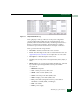
menus. The log displays (Figure 4-1).
Figure 4-1 Event Log
The log displays SNMP trap events, client-server communication
errors, and other problems recorded by the SAN management
application. Information provided is generally intended for use by
support personnel to fault isolate significant problems.
The log consists of the following columns:
• Date/Time - The date and time the event occurred.
• Event - An event number and brief description of the event.
Include this information when reporting the event to customer
support.