
FW 07.00.00/HAFM SW 08.06.00 McDATA Intrepid 6064 Director Installation and Service Manual (620-000108-920, April 2005)

4
Obtaining Log Information
4-5
Repair Information
• Product - The product associated with the event and configured
name or internet protocol (IP) address associated with the
instance are displayed.
• Data - Additional event data for fault isolation. Include this
information when fault isolating a call-home problem, or include
the information when reporting an event to customer support.
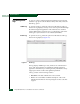
Session Log To open the Session Log, select the option from the Monitor and Logs
menus. The log displays a session (login and logout) history for the
SAN management application. This information is useful for system
administrators and users. For a log description, refer to the
SANavigator Software Release 4.1 User Manual (621-000013).
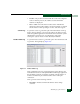
Product Status Log To open the Product Status Log, select the option from the Monitor and
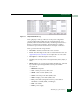
Logs menus. The log displays (Figure 4-2).
Figure 4-2 Product Status Log
The log reflects the previous and current status of the director, and
indicates the instance of a Intrepid 6064 Element Manager application
that should be opened to investigate a problem. The information is
useful to maintenance personnel for fault isolation and repair
verification.
The log consists of the following columns:
• Date/Time - The date and time the director status change
occurred.