
FW 07.00.00/HAFM SW 08.06.00 McDATA Intrepid 6064 Director Installation and Service Manual (620-000108-920, April 2005)

4
Obtaining Log Information
4-9
Repair Information
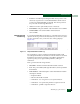
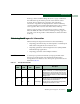
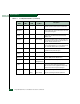
• Position - A number representing the FRU chassis position. The
chassis (slot) position for a nonredundant FRU is 0. The chassis
positions for redundant FRUs are 0 and 1. The chassis positions
for port cards are 0 through 15 inclusive.
• Action - The action performed (Inserted or Removed).
• Part Number - The part number of the inserted or removed FRU.
• Serial Number - The serial number of the inserted or
removed FRU.
Intrepid 6064 Link
Incident Log
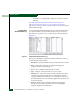
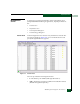
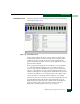
To open the Intrepid 6064 Link Incident Log, select the Link Incident Log
option from the Logs menu at the Hardware View, Port List View, Node
List View, Performance View, or FRU List View. The log displays
(Figure 4-5).
E
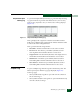
Figure 4-5 Intrepid 6064 Link Incident Log
The log displays a history of Fibre Channel link incidents (with
associated port numbers) for the director. The information is useful to
maintenance personnel for isolating port problems (particularly
expansion port (E_Port) segmentation problems) and repair
verification.
The log contains the following columns:
• Date/Time - The date and time the link incident occurred.
• Port - The port number (0 through 63 inclusive) that reported the
link incident.
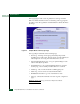
• Link Incident - A brief description of the link incident. Problem
descriptions include:
— Implicit incident.
— Bit-error threshold exceeded.
— Link failure - loss of signal or loss of synchronization.
— Link failure - not-operational primitive sequence received.
— Link failure - primitive sequence timeout.