
FW 07.00.00/HAFM SW 08.06.00 McDATA Intrepid 6064 Director Installation and Service Manual (620-000108-920, April 2005)

4
4-10
Intrepid® 6064 Director Installation and Service Manual
Repair Information
— Link failure - invalid primitive sequence received for current
link state.
See MAP 0600: Port Card Failure and Link Incident Analysis on
page 3-83 or MAP 0700: Fabric, ISL, and Segmented Port Problem
Determination on page 3-105 for corrective actions in response to these
link incident messages.
Intrepid 6064
Threshold Alert Log
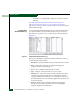
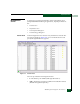
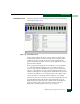
To open the Intrepid 6064 Threshold Alert Log, select the Threshold Alert
Log option from the Logs menu at the Hardware View, Port List View,
Node List View, Performance View, or FRU List View. The log displays
(Figure 4-6).
Figure 4-6 Intrepid 6064 Threshold Alert Log
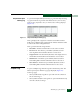
The log provides details of the threshold alert notifications. The log
contains the following columns:
•Date/Time - The date and time stamp for when the alert occurred.
•Name - The name for the alert as configured through the
Configure Threshold Alerts dialog box.
•Port - The port number where the alert occurred.
•Type - The type of alert: transmit (Tx) or receive (Rx).
• Utilization % - The percent usage of traffic capacity. This setting
constitutes the threshold value and is configured through the
Configure Threshold Alerts dialog box. For example, a value of 25
means that threshold occurs when throughput reaches 25 percent
of the port capacity.
•Interval - The time interval during which the throughput is
measured and an alert can generate. This is set through the
Configure Threshold Alerts dialog box.