
FW 07.00.00/HAFM SW 08.06.00 McDATA Intrepid 6064 Director Installation and Service Manual (620-000108-920, April 2005)

4
Obtaining Log Information
4-11
Repair Information
Intrepid 6064 Open
Trunking Log
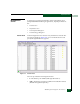
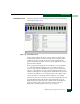
To open the Intrepid 6064 Open Trunking Log, select the Open Trunking
Log option from the Logs menu at the Hardware View, Port List View,
Node List View, Performance View, or FRU List View. The log displays
(Figure 4-7).
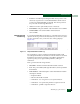
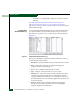
Figure 4-7 Intrepid 6064 Open Trunking Log
The log displays ISL congestion events that cause Fibre Channel
traffic to be routed through an alternate ISL. Entries reflect the traffic
re-route status at the managed director.
The log contains the following columns:
• Date/Time - The date and time the re-route action occurred.
• Receive Port - The director port number (decimal) used for
receiving Fibre Channel traffic after the re-route action.
• Target Domain - The domain ID (decimal) of the target device to
which Fibre Channel traffic from the director was rerouted.
• Old Exit Port - The director port number (decimal) used for
transmitting Fibre Channel traffic before the re-route action.
• New Exit Port - The director port number (decimal) used for
transmitting Fibre Channel traffic after the re-route action.
SANpilot Logs
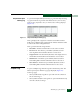
To open a SANpilot log, click the Logs tab at the Monitor panel. The
Monitor panel opens with the Logs page displayed (Figure 4-8).
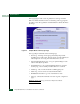
At the Logs page:
• Select (double-click) a log title to open and view the contents of
the associated log, or
• Select (double-click) the All Logs title to open and simultaneously
view the contents of all logs.