
FW 07.00.00/HAFM SW 08.06.00 McDATA Intrepid 6064 Director Installation and Service Manual (620-000108-920, April 2005)

4
4-14
Intrepid® 6064 Director Installation and Service Manual
Repair Information
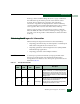
Beaconing Off or On Blinking Yellow Triangle The port is beaconing. The amber port LED blinks once
every two seconds to enable users to locate the port.
Invalid
Attachment
On Off Yellow Triangle The director port has an invalid attachment state. The
reasons for this state display in the Reasons field of the
Port Properties dialog box.
Link
Incident
Off Off Yellow Triangle A link incident occurred on the port. The alert symbol
appears at the Port Card View, Port List View, and
Hardware View.
Link Reset Off Off Yellow Triangle The director and attached device are performing a link
reset operation to recover the link connection. This is a
transient state that should not persist.
No Light Off Off None No signal (light) is received by the director port. This is a
normal condition when there is no cable attached to the
port or when the attached device is powered off.
Inactive On Off Yellow Triangle The port is inactive. The reason appears in the Reason
field at the Port Properties dialog box.
Not
Installed
Off Off None An optical transceiver is not installed in the director port.
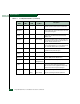
Not
Operational
Off Off Yellow Triangle The director port is receiving the not operational
sequence (NOS) from an attached device.
Port Failure Off On Red and Yellow
Blinking Diamond
The director port failed and requires service.
Segmented
E_Port
On Off Yellow Triangle The E_Port is segmented, preventing two connected
directors from joining and forming a multiswitch
fabric.The reasons for the segmentation display in the
Reasons field of the Port Properties dialog box.
Testing Off
On
Blinking
Blinking
Yellow Triangle
Yellow Triangle
The port is performing an internal loopback test.
The port is performing an external loopback test.
Table 4-2 Port Operational States (continued)
Port
State
Green
LED
Amber
LED
Alert
Symbol
Description