
FW 07.00.00/HAFM SW 08.06.00 McDATA Intrepid 6064 Director Installation and Service Manual (620-000108-920, April 2005)

4
Obtaining Port Diagnostic Information
4-15
Repair Information
Management
Server
To obtain port operational information at the management server
(Intrepid 6064 Element Manager application), inspect parameters at
the:
• Port List View.
• Performance View.
• Port Properties dialog box.
• Port Technology dialog box.
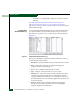
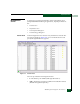
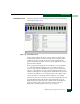
Port List View At the management server Products View, click the Port List tab. The
Port List View displays (Figure 4-9). A row of information for each
port (0 through 63 inclusive) appears.
Figure 4-9 Port List View
The view provides the following information:
• # - The director port number (0 through 63 inclusive).
• Addr - The director logical port address in hexadecimal format
(FICON management style only).