
FW 07.00.00/HAFM SW 08.06.00 McDATA Intrepid 6064 Director Installation and Service Manual (620-000108-920, April 2005)

4
4-22
Intrepid® 6064 Director Installation and Service Manual
Repair Information
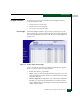
• Reason - A summary appears describing the reason if the port
state is Segmented E_Port, Invalid Attachment, or Inactive. For any
other port state, the reason field is blank or N/A.
• Threshold Alert- If a threshold alert exists for the port, an alert
indicator (yellow triangle) and the configured name for the alert
appear.
Port Technology
Dialog Box
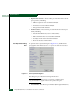
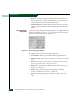
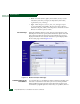
To open the Port Technology dialog box (Figure 4-12), right-click a port
graphic at the Hardware View or a port row at the Port List View, then
select Port Technology from the pop-up menu.
Figure 4-12 Port Technology Dialog Box
The dialog box provides the following information:
• Port Number - Director port number (0 through 63 inclusive).
• Connector type - Type of port connector (LC, Unknown, or Internal
Port).
• Transceiver - Type of port transceiver (Shortwave Laser, Longwave
Laser, Long Distance Laser, Unknown, or None).
• Distance - Port transmission distance (Short, Intermediate, Long,
Very Long, or Unknown).
• Media - Type of optical cable used (Singlemode, multimode
50-micron, multimode 62.5-micron, or Unknown).
• Speed - Operating speed (Not Established, 1 Gbps, 2 Gbps, or 10
Gbps).