
FW 07.00.00/HAFM SW 08.06.00 McDATA Intrepid 6064 Director Installation and Service Manual (620-000108-920, April 2005)

4
Obtaining Port Diagnostic Information
4-23
Repair Information
SANpilot Interface
To obtain port operational information at the SANpilot interface,
inspect parameters at the:
• Monitor Panel - Port List page.
• Monitor Panel - Port Stats page.
• View panel - Port Properties page.
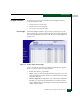
Port List Page When the SANpilot interface opens, the View panel appears as the
default. At the View panel, select the Monitor option at the left side of
the panel. The Monitor panel opens with the Port List page displayed
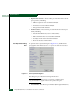
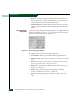
(Figure 4-13).
Figure 4-13 Monitor Panel (Port List Page)
A row of information for each port (0 through 63 inclusive) appears.
Each row consists of the following columns:
• Port # - The director port number.
• Name - The port name of 24 alphanumeric characters or less. The
name typically characterizes the device or fabric element to which
the port is attached.
• Block Configuration - Indicates if a port is blocked or unblocked.
Blocking a port prevents the attached devices or fabric element
from communicating. A blocked port continuously transmits the
offline sequence (OLS).