
FW 07.00.00/HAFM SW 08.06.00 McDATA Intrepid 6064 Director Installation and Service Manual (620-000108-920, April 2005)

4
4-24
Intrepid® 6064 Director Installation and Service Manual
Repair Information
• State - Port state (Online, Offline, Not Installed, Inactive, Invalid
Attachment, Link Reset, No Light, Not Operational, Port Failure,
Segmented E_Port, or Te s t in g ).
• Type - The Port type (G_Port, F_Port, or E_Port) type of port
(G_Port if nothing is attached to the port, F_Port if a device is
attached to the port, and E_Port if the port is connected to another
director or switch as part of an ISL).
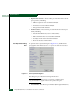
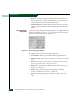
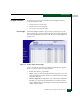
Port Stats Page When the SANpilot interface opens, the View panel appears as the
default panel. At the View panel, select the Monitor option at the left
side of the panel. The Monitor panel opens with the Port List page
displayed. Click the Port Stats tab. The Monitor panel displays with
the Port Stats page selected (Figure 4-14).
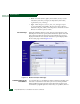
Figure 4-14 Monitor Panel (Port Stats Page)
Troubleshooting Tip for
Port Statistics
As a general rule, you should clear all the counters by selecting Clear
Port Stats or Clear All Port Stats after you have resolved a problem.
When troubleshooting, keep track of the time interval when errors
accumulate to judge the presence and severity of a problem. (There is