
FW 07.00.00/HAFM SW 08.06.00 McDATA Intrepid 6064 Director Installation and Service Manual (620-000108-920, April 2005)

4
Obtaining Port Diagnostic Information
4-29
Repair Information
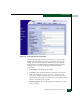
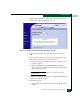
Figure 4-15 View Panel (Port Properties Page)
The Port Properties page displays information for one port. Values
update only when the page opens for a selected port or the user
selects Get Port Properties. The page defaults to port 0. Increment or
decrement the port number displayed (0 through 63 inclusive) by
clicking Fwd>> or <<Back. The page provides the following
information:
• Port Number - The director port number.
• Port Name - The user-defined name or description for the port.
• Type - The Port type (G_Port, F_Port, or E_Port) type of port
(G_Port if nothing is attached to the port, F_Port if a device is
attached to the port, and E_Port if the port is connected to another
director or switch as part of an ISL).
• Operating Speed - The operating speed (Not Established, 1 Gbps, 2
Gbps, or 10 Gbps).