
FW 07.00.00/HAFM SW 08.06.00 McDATA Intrepid 6064 Director Installation and Service Manual (620-000108-920, April 2005)

4
4-30
Intrepid® 6064 Director Installation and Service Manual
Repair Information
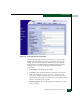
• Port WWN - The Fibre Channel world wide name (WWN) for the
port.
• Block Configuration - the user-configured state for the port
(Blocked or Unblocked).
• Beaconing - The user-specified for the port (On or Off).
• FAN Configuration - The user-configured state for fabric address
notification (FAN) configuration (Enabled or Disabled).
• Operational State - The port state (Online, Offline, Not Installed,
Inactive, Invalid Attachment, Link Reset, No Light, Not Operational,
Port Failure, Segmented E_Port, or Testing).
• Reason - A summary appears describing the reason if the port
state is Segmented E_Port, Invalid Attachment, or Inactive. For any
other port state, the reason is N/A.
• Technology - Information specific to the installed optical
transceiver, including connector type, transceiver optics, data
transmission distance, optical media (cable type), and
transmission speed.
Performing Port Diagnostic Loopback Tests
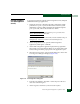
Port diagnostics consist of internal and external loopback tests. The
tests are performed on any selected port at the management server
(Intrepid 6064 Element Manager application) or at the SANpilot
interface. The tests are:
• Internal loopback test - An internal loopback test checks port
card circuitry, but does not check fiber-optic components of a port
transceiver. The test is performed with a device attached to the
port, but the test momentarily blocks the port and is disruptive to
the attached device.
• External loopback test - An external loopback test checks port
card circuitry, including fiber-optic components of a port
transceiver. To perform the test, the attached device must be
quiesced and disconnected from the port, and a multimode or
singlemode loopback plug must be inserted in the port receptacle.