
FW 07.00.00/HAFM SW 08.06.00 McDATA Intrepid 6064 Director Installation and Service Manual (620-000108-920, April 2005)

4
4-34
Intrepid® 6064 Director Installation and Service Manual
Repair Information
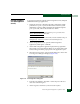
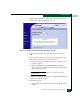
11. Click Start Test. The test begins and:
a. The Start Test button changes to a Stop Test button.
b. The message Port xx: TEST RUNNING appears.
c. A red progress bar (indicating percent completion) travels
from left to right across the Completion Status field.
NOTE: Click Stop Test at any time to abort the loopback test.
12. When the test completes, results appear as Port xx: Passed! or
Port xx: Failed! in the message area of the dialog box.
13. When finished, click Cancel to close the Port Diagnostics dialog
box.
14. Remove the loopback plug and reconnect the fiber-optic jumper
cable from the device to the port.
15. Reset the port:
a. At the Hardware View, right-click the port graphic. A pop-up
menu appears.
b. Select the Reset Port option. A Message message box displays,
indicating a link reset operation will occur.
c. Click OK. The port resets.
16. Notify the customer the test is complete and the device can be
reconnected to the director and set online.
Internal Loopback
Test (SANpilot
Interface)
To perform an internal loopback at the SANpilot interface:
1. Notify the customer that a disruptive internal loopback test is to
be performed. Ensure the customer system administrator
quiesces Fibre Channel frame traffic through the port, and sets the
attached device offline.
NOTE: An optical transceiver (SFP or XFP) must be installed in the port
during the test. A device can remain connected during the test.
2. When the SANpilot interface opens, the View panel and Switch
page appear as the default. At the View panel, select the Operations
option at the left side of the panel. The Operations panel opens
with the Switch page displayed.