
FW 07.00.00/HAFM SW 08.06.00 McDATA Intrepid 6064 Director Installation and Service Manual (620-000108-920, April 2005)

4
4-38
Intrepid® 6064 Director Installation and Service Manual
Repair Information
• Chassis slot number.
• The consecutive port numbers on the selected card. Valid
port numbers are in the range of 0 through 63 inclusive.
c. Double-click the port card with the port to be configured. The
Port Card View for the selected card displays.
d. Right-click the port to be configured, then select Channel Wrap
from the menu. The Channel Wrap On for Port n (where n is the
port number) window displays.
e. Click OK to enable channel wrapping for the port.
3. Perform the fibre link test at the S/390 host attached to the
configured port. For test instructions, refer to the service
documentation delivered with the S/390 system.
Swapping Ports (FICON)
Use the port swap procedure to swap a device connection and logical
port address from a failed Fibre Channel port to an operational port.
Because both ports are blocked during the procedure, director
communication with the attached device is momentarily disrupted.
To perform the port swap procedure for a pair of director ports:
1. Notify the customer a port swap procedure will be performed
and a fiber-optic cable or cables will be disconnected. Ensure the
customer system administrator quiesces Fibre Channel frame
traffic through the ports and sets attached devices offline.
2. At the management server, open the EFC Manager application.
The Products View displays.
3. Double-click the icon representing the director for which the
loopback test will be performed. The Hardware View for the
selected director displays.
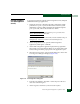
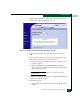
4. Click Maintenance and select Swap Ports. The Swap Ports dialog
box displays (Figure 4-18).