
FW 07.00.00/HAFM SW 08.06.00 McDATA Intrepid 6064 Director Installation and Service Manual (620-000108-920, April 2005)


4
Collecting Maintenance Data
4-39
Repair Information
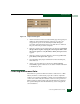
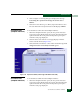
Figure 4-18 Swap Ports Dialog Box
5. At the First address and Second address fields, type the logical port
addresses (in hexadecimal format) of the pair of ports to be
swapped. The ports are automatically blocked during the
procedure. Select the Unblock after swap check boxes to unblock
the ports when the procedure completes.
6. Click Next. At the Swap Ports dialog box, the message Continuing
this procedure requires varying the selected ports offline. Ask
the system operator to vary the link(s) offline, then press Next.
appears.
7. Click Next. At the Swap Ports dialog box, the message Move the
port cable(s). Then press Next. appears.
8. Swap the fiber-optic jumper cables between the selected ports,
then click Next.
9. At the Swap Ports dialog box, the message Ports swapped
successfully. appears. Click Next to close the window and return
to the Hardware View.
Collecting Maintenance Data
When director operational firmware detects a critical error or FRU
failure, the director automatically copies the contents of dynamic
random access memory (DRAM) to a dump area in FLASH memory
on the active CTP2 card, then initiates a failover to the operational
FRU. The director then transfers (through the Ethernet connection)
the captured dump file from FLASH memory to the management
server hard drive.