
FW 07.00.00/HAFM SW 08.06.00 McDATA Intrepid 6064 Director Installation and Service Manual (620-000108-920, April 2005)


4
4-40
Intrepid® 6064 Director Installation and Service Manual
Repair Information
NOTE: An optional full-volatility feature is often required at military sites
that process classified data. If the feature is enabled through a product feature
enablement (PFE) key, a memory dump file (that possibly includes classified
Fibre Channel frames) is not included as part of the data collection
procedure.
Perform the maintenance data collection procedure after a firmware
fault is corrected or a failed FRU is replaced to capture the data for
analysis. Maintenance data includes the dump file, hardware log,
audit log, and an engineering log viewable only by support
personnel.
Management
Server
To collect maintenance data (retrieve the dump file from the
management server hard drive) from the Intrepid 6064 Element
Manager application:
1. At the management server, open the SAN management
application (SANavigator or EFCM).
2. At the SAN management application physical map, right-click
the product icon representing the director for which the data
collection procedure is to be performed, then select Element
Manager from the pop-up menu. The application opens.
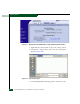
3. Select the Data Collection option from the Maintenance menu. The
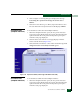
Save Data Collection dialog box displays (Figure 4-19).
Figure 4-19 Save Data Collection Dialog Box
4. Remove the backup CD from the management server compact
disk- rewritable (CD-RW) drive and insert a blank rewritable CD.