
FW 07.00.00/HAFM SW 08.06.00 McDATA Intrepid 6064 Director Installation and Service Manual (620-000108-920, April 2005)


4
Collecting Maintenance Data
4-41
Repair Information
5. At the Save Data Collection dialog box, select the compact disc
drive (D:\) from the Look in drop-down menu, then type a
descriptive name for the collected maintenance data in the File
name field.
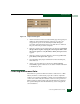
6. The Data Collection dialog box (Figure 4-20) displays with a
progress bar that shows percent completion of the data collection.
When the process reaches 100%, the Cancel button changes to a
Close Button.
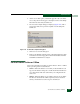
Figure 4-20 Data Collection Dialog Box
7. Click Close to close the dialog box.
8. Remove the CD with the newly-collected maintenance data from
the management server CD-RW drive. Return the CD with the
failed FRU to McDATA for analysis.
9. To ensure the backup application operates normally, replace the
original backup CD in the management server CD-RW drive.
SANpilot Interface
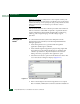
To collect maintenance data (retrieve the dump file from the CTP2
card) at the SANpilot interface:
1. When the SANpilot interface opens, the View panel and Switch
page appear as the default. At the View panel, select the Operations
option at the left side of the panel. The Operations panel opens
with the Director page displayed.
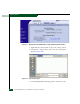
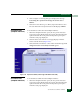
2. Click the Maintenance tab, then the System Filesl tab. The
Maintenance page displays with the System Files tab selected
(Figure 4-21).