
FW 07.00.00/HAFM SW 08.06.00 McDATA Intrepid 6064 Director Installation and Service Manual (620-000108-920, April 2005)


4
Set the Director Online or Offline
4-43
Repair Information
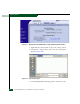
6. At the Save As dialog box, select the floppy drive (A:\) from the
Save in drop-down menu, type a descriptive name for the dump
file in the File name field, and click Save.
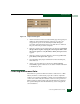
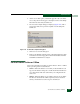
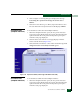
7. The Download complete dialog box displays (Figure 4-23) with a
progress bar that shows percent completion of the dump file
download.
Figure 4-23 Download Complete Dialog Box
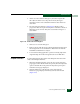
8. Click Close to close the dialog box.
9. Remove the diskette with the newly-collected maintenance data
from the browser PC floppy drive. Return the diskette with the
failed FRU to McDATA for analysis.
Set the Director Online or Offline
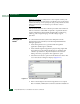
This section describes procedures to set the director online or offline.
These operating states are described as:
• Online - When the director is set online, an attached device can
log in to the director if the port is not blocked. Attached devices
can communicate with each other if they are configured in the
same zone.
• Offline - When the director is set offline, all ports are set offline.
The director transmits the offline sequence (OLS) to attached
devices, and the devices cannot log in to the director.