
FW 07.00.00/HAFM SW 08.06.00 McDATA Intrepid 6064 Director Installation and Service Manual (620-000108-920, April 2005)


4
4-44
Intrepid® 6064 Director Installation and Service Manual
Repair Information
NOTE: When the director is set offline, the operation of attached Fibre
Channel devices is disrupted. Do not set the director offline unless directed to
do so by a procedural step or the next level of support.
Set Online State
(Management
Server)
To set the director online from the management server (Intrepid 6064
Element Manager application):
1. At the management server, open the SAN management
application (SANavigator or EFCM).
2. At the SAN management application physical map, right-click
the product icon representing the director to be set online, then
select Element Manager from the pop-up menu. The application
opens.
3. Select the Set Online State option from the Maintenance menu. The
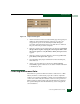
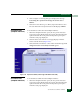
Set Online State dialog box displays (Figure 4-24).
Figure 4-24 Set Online State Dialog Box
4. Click Set Online. A warning dialog box displays the message
Performing this operation will change the current state to
Online.
5. Click OK. As the director comes online, observe the Hardware
View. The Status field of the Intrepid 6064 Status table displays
Online.
Set Offline State
(Management
Server)
To set the director offline from the management server (Intrepid 6064
Element Manager application):
1. At the management server, open the SAN management
application (SANavigator or EFCM).
2. At the SAN management application physical map, right-click
the product icon representing the director to be set offline, then
select Element Manager from the pop-up menu. The application
opens.
3. Select the Set Online State option from the Maintenance menu. The
Set Online State dialog box displays (Figure 4-24).