
FW 07.00.00/HAFM SW 08.06.00 McDATA Intrepid 6064 Director Installation and Service Manual (620-000108-920, April 2005)


4
4-48
Intrepid® 6064 Director Installation and Service Manual
Repair Information
7. Click OK. The following occur to indicate the port card is blocked
and offline:
— Emulated green LEDs associated with all ports extinguish at
the Hardware View.
— Green LEDs associated with all ports extinguish at the
director.
Unblock a Port
(Management
Server)
To unblock a director port from the management server (Intrepid
6064 Element Manager application):
1. At the management server, open the SAN management
application (SANavigator or EFCM).
2. At the SAN management application physical map, right-click
the product icon representing the director for which the port is to
be unblocked, then select Element Manager from the pop-up
menu. The application opens.
3. Click the Hardware tab. The Hardware View for the selected
director displays.
4. Move the cursor over the port to be unblocked and right-click the
mouse to open a list of menu options.
1. Select the Block Port menu option. Note the check mark in the box
adjacent to the menu item, indicating the port is blocked. A
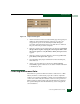
Warning dialog box displays (Figure 4-27).
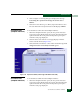
Figure 4-27 Unblocking Port Warning Box
2. Click OK. The following occur to indicate the port is unblocked
and online:
— The emulated green LED associated with the port illuminates
at the Hardware View.
— The green LED associated with the port illuminates at the
director.
— The check box adjacent to the Block Port menu option becomes
blank.