
FW 07.00.00/HAFM SW 08.06.00 McDATA Intrepid 6064 Director Installation and Service Manual (620-000108-920, April 2005)

4
Blocking and Unblocking Ports
4-49
Repair Information
Unblock a Port Card
(Management
Server)
To unblock all ports on a director port card from the management
server (Intrepid 6064 Element Manager application):
1. At the management server, open the SAN management
application (SANavigator or EFCM).
2. At the SAN management application physical map, right-click
the product icon representing the director for which the port is to
be unblocked, then select Element Manager from the pop-up
menu. The application opens.
3. Click the Hardware tab. The Hardware View for the selected
director displays.
4. Move the cursor over the port card to be unblocked and
right-click the mouse to open a list of menu options.
5. Select the Unblock All Ports menu option. A Warning dialog box
displays.
6. Click OK. The following occur to indicate the port card is
unblocked and online:
— Emulated green LEDs associated with all ports illuminate at
the Hardware View.
— Green LEDs associated with all ports illuminate at the director.
Block a Port
(SANpilot Interface)
To block a director port from the SANpilot interface:
1. When the SANpilot interface opens, the View panel and Switch
page appear as the default. At the View panel, select the Configure
option at the left side of the panel. The Configure panel opens with
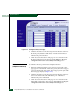
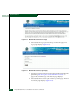
the Ports page displayed (Figure 4-28).