
FW 07.00.00/HAFM SW 08.06.00 McDATA Intrepid 6064 Director Installation and Service Manual (620-000108-920, April 2005)

4
4-50
Intrepid® 6064 Director Installation and Service Manual
Repair Information
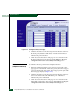
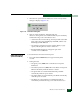
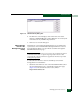
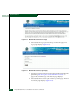
Figure 4-28 Configure Panel (Ports Page)
2. Click the check box for the selected port in the Blocked column to
block the port (default is unblocked). A check mark in the box
indicates the port is blocked.
3. Click Activate at the bottom of the page to save and activate the
blocked configuration. The message Your changes to the port
configuration have been successfully activated appears.
Unblock a Port
(SANpilot Interface)
To unblock a director port from the SANpilot interface:
1. When the SANpilot interface opens, the View panel and Switch
page appear as the default. At the View panel, select the Configure
option at the left side of the panel. The Configure panel opens with
the Ports page displayed (Figure 4-28).
2. Click the check box for the selected port in the Blocked column to
remove the check mark and unblock the port. A blank box
indicates the port is unblocked.
3. Click Activate at the bottom of the page to save and activate the
unblocked configuration. The message Your changes to the port
configuration have been successfully activated appears.