
FW 07.00.00/HAFM SW 08.06.00 McDATA Intrepid 6064 Director Installation and Service Manual (620-000108-920, April 2005)

4
Cleaning Fiber-Optic Components
4-51
Repair Information
Cleaning Fiber-Optic Components
Perform this procedure as directed in this publication and when
connecting or disconnecting fiber-optic cables from port card
connectors (if necessary). To clean fiber-optic components:
1. Obtain the appropriate tools (portable can of oil-free compressed
air and alcohol pads) from the fiber-optic cleaning kit.
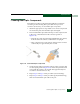
2. Disconnect the fiber-optic cable from the port. Use compressed air
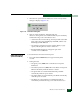
to blow any contaminants from the connector (part A of
Figure 4-29).
— Keep the air nozzle approximately 50 millimeters (two inches)
from the end of the connector and hold the can upright.
— Blow compressed air on the surfaces and end of the connector
continuously for approximately five seconds.
Figure 4-29 Clean Fiber-Optic Components
3. Gently wipe the end-face and other surfaces of the connector with
an alcohol pad (part B of Figure 4-29). Ensure the pad makes full
contact with the surface to be cleaned. Wait approximately five
seconds for cleaned surfaces to dry.
4. Repeat step 2 and step 3 of this procedure (second cleaning).
5. Repeat step 2 and step 3 of this procedure again (third cleaning),
then reconnect the fiber-optic cable to the port.