
FW 07.00.00/HAFM SW 08.06.00 McDATA Intrepid 6064 Director Installation and Service Manual (620-000108-920, April 2005)

4
4-54
Intrepid® 6064 Director Installation and Service Manual
Repair Information
• Reload director firmware from FLASH memory.
• Reset the Ethernet LAN interface, causing the connection to the
management server to drop momentarily until the connection
automatically recovers.
A director reset is more disruptive and resets the:
• Microprocessor and functional logic for the CTP card and reloads
the firmware from FLASH memory.
• Ethernet LAN interface, causing the connection to the
management server to drop momentarily until the connection
automatically recovers.
• Ports, causing all Fibre Channel connections to drop momentarily
until the connections automatically recover. This causes attached
devices to log out and log back in, therefore data frames lost
during director reset must be retransmitted.
IML the Director
(CTP Front Panel)
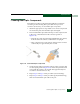
To IML the director from the CTP front panel:
1. Press and hold the IML button for approximately three seconds.
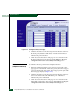
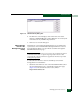
2. During the IML, the director-to-management server Ethernet link
drops momentarily and the following occur at the Hardware View:
— As the network connection drops, the Intrepid 6064 Status table
turns yellow, the Status field displays No Link, and the State
field displays Link Timeout.
— The status bar at the bottom of the window displays a grey
square, indicating director status is unknown.
— Illustrated FRUs disappear, and appear again as the
connection is re-established.
IPL the Director
(Management
Server)
To IPL the director from the management server (Intrepid 6064
Element Manager application):
1. At the management server, open the SAN management
application (SANavigator or EFCM).
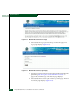
2. At the SAN management application physical map, right-click
the product icon representing the director requiring an IPL, then
select Element Manager from the pop-up menu. The application
opens.