
FW 07.00.00/HAFM SW 08.06.00 McDATA Intrepid 6064 Director Installation and Service Manual (620-000108-920, April 2005)

4
IML, IPL, or Reset the Director
4-55
Repair Information
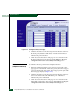
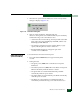
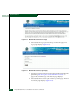
3. Select the IPL option from the Maintenance menu. An Information
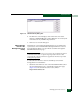
dialog box displays (Figure 4-30).
Figure 4-30 Information Dialog Box
4. Click Yes to IPL the director. During the IPL, the
director-to-management server Ethernet link drops momentarily
and the following occur at the Hardware View:
— As the network connection drops, the Intrepid 6064 Status table
turns yellow, the Status field displays No Link, and the State
field displays Link Timeout.
— The status bar at the bottom of the window displays a grey
square, indicating director status is unknown.
— Illustrated FRUs disappear, and appear again as the
connection is re-established.
Reset the Director
(CTP Front Panel)
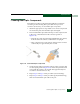
To reset the director from the CTP front panel:
1. Press and hold the RESET button for approximately three
seconds.
2. During the reset:
— The green power (PWR) LED on the director front panel
illuminates.
— The amber system error (ERR) LED on the director front panel
blinks momentarily while the director is tested.
— The green LEDs associated with the Ethernet port blink
momentarily while the port is tested.
— The amber LEDs associated with the ports blink momentarily
while the ports are tested.
— The director-to-management server Ethernet link drops
momentarily and the following occur at the Hardware View: