
FW 07.00.00/HAFM SW 08.06.00 McDATA Intrepid 6064 Director Installation and Service Manual (620-000108-920, April 2005)

4
4-56
Intrepid® 6064 Director Installation and Service Manual
Repair Information
• As the network connection drops, the Intrepid 6064 Status
table turns yellow, the Status field displays No Link, and
the State field displays Link Timeout.
• The status bar at the bottom of the window displays a grey
square, indicating director status is unknown.
• Illustrated FRUs disappear, and appear again as the
connection is re-established.
Managing Firmware Versions
Firmware is the director operating code stored in FLASH memory on
the CTP card. Up to 32 firmware versions can be stored on the
management server hard drive and made available for download to a
director through the Intrepid 6064 Element Manager application.
Multiple firmware versions can be stored on a browser PC hard drive
and made available for download to the director from the SANpilot
interface.
Management
Server
Service personnel can perform the following firmware management
tasks from the management server (Intrepid 6064 Element Manager
application):
• Determine the firmware version active on a director.
• Add to and maintain a library of up to 32 firmware versions on
the management server hard drive.
• Download a firmware version to a selected director.
Determine a Director
Firmware Version
To determine a selected director firmware version from the
management server (Intrepid 6064 Element Manager application):
1. At the management server, open the SAN management
application (SANavigator or EFCM).
2. At the SAN management application physical map, right-click
the product icon representing the director to be inspected for
firmware version, then select Element Manager from the pop-up
menu. The application opens.
3. Select the Firmware Library option from the Maintenance menu.
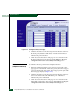
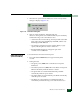
The Firmware Library dialog box displays (Figure 4-31).