
FW 07.00.00/HAFM SW 08.06.00 McDATA Intrepid 6064 Director Installation and Service Manual (620-000108-920, April 2005)

4
Managing Firmware Versions
4-57
Repair Information
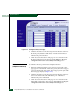
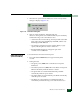
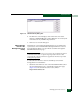
Figure 4-31 Firmware Library Dialog Box
4. The firmware version displays at the lower left corner of the
dialog box in XX.YY.ZZ format, where XX is the version level, YY
is the release level, and ZZ is the patch level.
5. Click Close to close the dialog box.
Add a Firmware
Version to the
Management Server
Library
The firmware version shipped with the director is provided on the
System Version XX.YY.ZZ CD-ROM. Subsequent firmware versions
for upgrading the director are provided to customers through the
McDATA Internet home page.
NOTE: When adding a firmware version, follow all procedural information
contained in release notes or engineering change (EC) instructions that
accompany the code. This information supplements information provided
in this general procedure.
To add a director firmware version to the library stored on the
management server hard drive:
1. Obtain the new firmware version from the McDATA File Center.
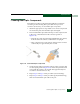
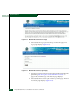
At a PC with Internet access, open the File Center home page
(Figure 4-32). The uniform resource locator (URL) is
http://central.mcdata.com.