
FW 07.00.00/HAFM SW 08.06.00 McDATA Intrepid 6064 Director Installation and Service Manual (620-000108-920, April 2005)

4
4-60
Intrepid® 6064 Director Installation and Service Manual
Repair Information
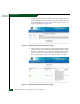
6. Authorization to download a firmware version requires approval
from the McDATA Solution Center. In the Action column adjacent
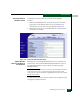
to the desired firmware version, click Add to Request. The Current
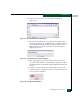
Request page displays (Figure 4-36).
Figure 4-36 McDATA File Center (Current Request Page)
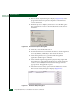
7. Click Submit Request. The Request Submitted page displays and the
request for approval is e-mailed to the McDATA Solution Center.
Wait five to ten minutes for a response from McDATA, then select
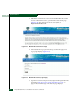
(click) the My Requests option at the top of the page. The Request
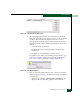
History page displays (Figure 4-37) with the approved request.
Figure 4-37 McDATA File Center (Request History Page)