
FW 07.00.00/HAFM SW 08.06.00 McDATA Intrepid 6064 Director Installation and Service Manual (620-000108-920, April 2005)

4
4-62
Intrepid® 6064 Director Installation and Service Manual
Repair Information
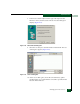
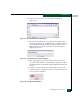
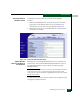
11. The Download complete dialog box displays (Figure 4-40) with a
progress bar that shows percent completion of the firmware
version download.
12. When the process completes, click Close to close the dialog box.
The new firmware version is downloaded and saved to the PC
hard drive.
Figure 4-40 Download Complete Dialog Box
13. At the PC, close the Internet session.
14. Transfer the firmware version file from the PC to the management
server by diskette, CD-ROM, or other electronic means.
15. At the management server, open the SAN management
application (SANavigator or EFCM).
16. At the SAN management application physical map, right-click
the product icon representing the director for which a firmware
version is to be added, then select Element Manager from the
pop-up menu. The application opens.
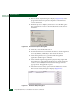
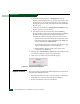
17. Select the Firmware Library option from the Maintenance menu.
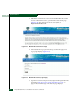
The Firmware Library dialog box displays (Figure 4-41).
Figure 4-41 Firmware Library Dialog Box