
FW 07.00.00/HAFM SW 08.06.00 McDATA Intrepid 6064 Director Installation and Service Manual (620-000108-920, April 2005)

4
4-64
Intrepid® 6064 Director Installation and Service Manual
Repair Information
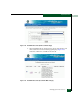
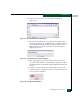
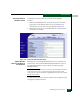
22. The File Transfer message box converts to a Transfer Complete
message box, indicating the new firmware version is stored on
the management server hard drive. Click Close to close the
message box.
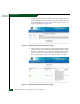
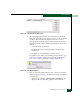
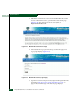
23. The new firmware version and associated description appear in
the Firmware Library dialog box. Click Close to close the window
and return to the Hardware View.
24. To send the firmware version to a director, see Download a
Firmware Version to a Director following.
Download a Firmware
Version to a Director
NOTE: When downloading a firmware version, follow procedural
information in release notes or EC instructions that accompany the firmware
version. This information supplements information provided in this general
procedure.
To download a firmware version to a selected director from the
management server (Intrepid 6064 Element Manager application):
1. At the management server, open the SAN management
application (SANavigator or EFCM).
2. Before downloading firmware version XX.YY.ZZ to a director,
ensure version XX.YY.ZZ or higher of the SAN management
application is running on the server.
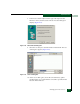
a. Select the About option from the Help menu. The About dialog
box displays the SAN management application version. Click
Close to close the dialog box.
b. If required, install the correct version of the application
(Installing or Upgrading Software on page 4-82).
3. At the SAN management application physical map, right-click
the product icon representing the director for which a firmware
version is to be downloaded, then select Element Manager from the
pop-up menu. The application opens.
4. As a precaution to preserve director configuration information,
perform the data collection procedure (Collecting Maintenance
Data on page 4-39).
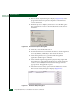
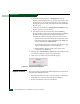
5. Select the Firmware Library option from the Maintenance menu.
The Firmware Library dialog box displays (Figure 4-45).