
FW 07.00.00/HAFM SW 08.06.00 McDATA Intrepid 6064 Director Installation and Service Manual (620-000108-920, April 2005)

4
Managing Firmware Versions
4-67
Repair Information
Determine Director
Firmware Version
To determine a director firmware version from the SANpilot
interface:
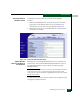
1. When the SANpilot interface opens, the View panel and Switch
page appear as the default. At the View panel, click the Unit
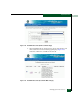
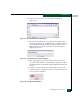
Properties tab. The Unit Properties page displays (Figure 4-48).
2. At the bottom of the page, record the firmware version listed in
the Firmware Level field.
Figure 4-48 View Panel (Unit Properties Page)
Add a Firmware
Version to the Browser
PC Hard Drive
The firmware version shipped with the director is provided on the
System Version XX.YY.ZZ CD-ROM. Subsequent firmware versions
for upgrading the director are provided to customers through
McDATA website.
NOTE: When adding a firmware version, follow all procedural information
contained in release notes or engineering change (EC) instructions that
accompany the code. This information supplements information provided in
this general procedure.
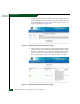
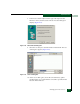
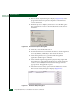
To add a director firmware version to the browser PC hard drive (PC
running the SANpilot interface):