
FW 07.00.00/HAFM SW 08.06.00 McDATA Intrepid 6064 Director Installation and Service Manual (620-000108-920, April 2005)

4
Managing Firmware Versions
4-73
Repair Information
Download a Firmware
Version to the Director
To download a firmware version to the director from the SANpilot
interface:
NOTE: When downloading a firmware version, follow all procedural
information contained in release notes or EC instructions that accompany the
firmware version. This information supplements information provided in
this general procedure.
1. When the SANpilot interface opens, the View panel and Switch
page appear as the default. At the View panel, select the Operations
option at the left side of the panel. The Operations panel opens
with the Switch page displayed.
2. Click the Maintenance and Firmware Upgrade tabs. The Maintenance
page displays with the Firmware Upgrade tab selected
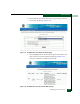
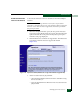
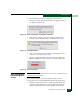
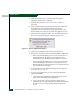
(Figure 4-58).
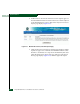
Figure 4-58 Operations Panel (Maintenance Page with Firmware Upgrade Tab)
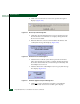
3. At the Download Firmware file from field:
— Select the desired firmware file from the PC hard drive using
the Browse button, or
— Type the desired firmware filename in the Download Firmware
file from field.