
FW 07.00.00/HAFM SW 08.06.00 McDATA Intrepid 6064 Director Installation and Service Manual (620-000108-920, April 2005)



5
Removing and Replacing FRUs
5-3
Removal and Replacement Procedures (RRPs)
ESD Information
Follow all ESD procedures, DANGER statements, and CAUTION
statements. When removing and replacing FRUs, always connect a
grounding cable to the director chassis and wear an ESD wrist strap.
ATTENTION! To avoid causing machine errors or damage while working on
the director, follow ESD procedures by connecting a grounding cable to the
director chassis and wearing an ESD wrist strap.
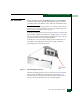
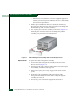
The ESD grounding point for the front of the chassis is located at the
bottom center, adjacent to the left power supply (Figure 5-1). Touch
the chassis once before performing any maintenance action, and once
each minute while removing or replacing FRUs.
If the director is not connected to facility power (and therefore not
grounded), connect the ESD wrist strap to an approved bench
grounding point instead of the chassis.
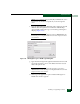
Figure 5-1 ESD Grounding Point (Front)
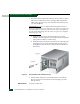
The ESD grounding point for the rear of the chassis is located at the
bottom center, directly below the maintenance port (Figure 5-2).
Touch the chassis once before performing any maintenance action,
and once each minute while removing or replacing FRUs.