
FW 07.00.00/HAFM SW 08.06.00 McDATA Intrepid 6064 Director Installation and Service Manual (620-000108-920, April 2005)


5
RRP: Cable Management Assembly
5-5
Removal and Replacement Procedures (RRPs)
Nonconcurrent FRUs
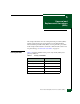
Table 5-3 lists the nonconcurrent FRUs. Nonconcurrent FRUs are
removed and replaced after the director is powered off. The table also
lists ESD precautions (yes or no) for each FRU, and references the
page number of the removal and replacement procedure.
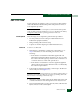
RRP: Cable Management Assembly
Use the following procedures to remove or replace the cable
management assembly at the front of the director. A list of tools
required is provided.
Tools Required A door key with 5/16-inch socket (provided with the FC-512
Fabricenter equipment cabinet) is required to perform these
procedures.
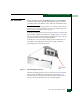
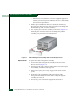
Removal To remove the cable management assembly:
1. If the director is installed in a stand-alone configuration, go to
step 2. If the director is rack-mounted, perform one of the
following:
— If the director is installed in a McDATA-supplied FC-512
Fabricenter equipment cabinet, insert the 5/16" door tool into
the socket hole at the right top of the front door. Turn the tool
counter-clockwise to unlock and open the door.
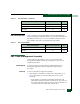
Radio frequency interference (RFI) shield No 5-25
Serial crossbar (SBAR) assembly Yes 5-26
Fan module Yes 5-30
Table 5-2 Concurrent FRUs (continued)
Concurrent FRU Name ESD Precaution Requirement Page
Table 5-3 Nonconcurrent FRUs
Nonconcurrent FRU Name ESD Precaution Requirement Page
Power module assembly Yes 5-33
Backplane Yes 5-36